

Automatic project memory for Claude Code. Also works with Cursor and Codex.
What is jevmem?
Say it once. jevmem saves the decisions, rules and failed approaches from your Claude Code chats to JEVMEM.md in your repo, and brings the relevant ones back next session. Before Claude runs a command or edits a file, it checks the call against your saved rules. It is open source (MIT), built on TypeSafe AI's Jev, in Anthropic's Claude plugin directory and on the MCP Registry, and works with Cursor and Codex over MCP.
What was measured #
- Does Claude act on what was saved? With jevmem, Claude followed the project's decision in 66/72 sessions; with no project memory, in 28/72; with the same lines in a hand-written
CLAUDE.md, in 67/72. It tried a change the project forbids in 10/18 sessions with no memory and 0/18 with jevmem, and repeated an approach that had already failed in 3/15 against 0/15. Measured on 24 tasks in three small projects, 3 runs each, in real Claude Code 2.1.281 sessions withclaude-sonnet-5, on 2026-09-28 and 2026-09-29 (no memory and CLAUDE.md, jevmem). - The guard caught 66 of 68 rule breaks, with 3–4 false asks in 206 fine calls, on a held-out set of 274 tool calls, run once on 0.6.0 and once on 0.6.1 on 2026-09-30 (0.6.0, 0.6.1).
- Deciding what to save takes 0.28 s and costs $0.00016 per message, and was right on save or skip for 98.5% of 66 held-out turns (jevmem 0.6.0, one run, 2026-09-30, results).
- A local model in Jev's place was tried once, on 2026-10-02, with Ollaya 0.9.0 on an Apple M4 with 16 GB: on the same 66 turns Jev was right on save or skip for 65/66 at a median of 0.23 s a turn,
winnow:e4bfor 60/66 at 28.5 s, andlaya:typed-decisionsfor 19/66. One run each, on one Mac (Jev, winnow:e4b, laya:typed-decisions; more in the FAQ).
Every test set was written by the author, and none is an independent benchmark. The method and the limits of each number: Does jevmem work?
How it works #
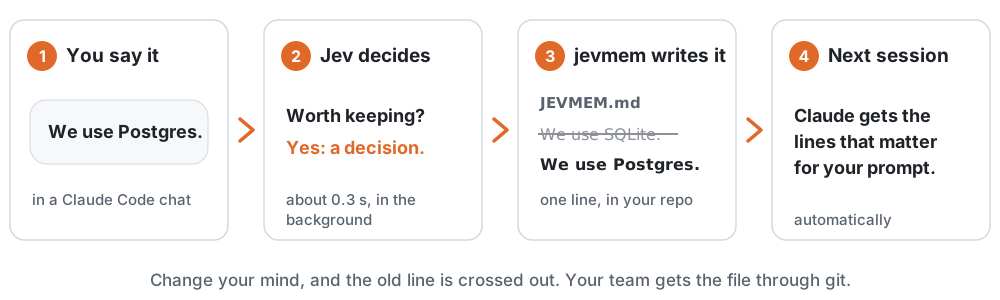
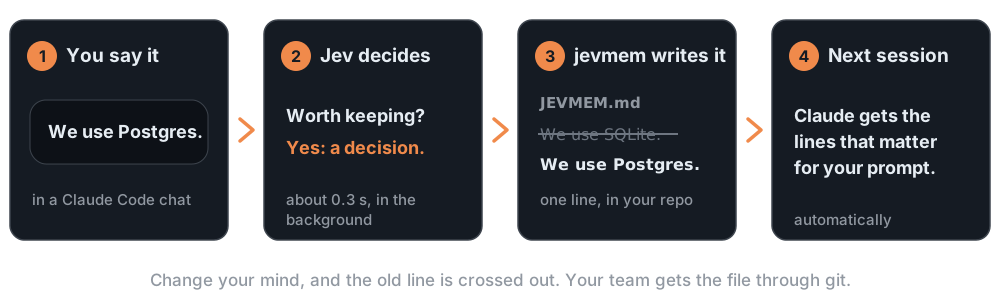
- You decide something in a chat: "We use Postgres."
- jevmem asks Jev by TypeSafe AI, a model that answers yes/no questions with probabilities, whether it's worth keeping.
- If it is, jevmem writes one line to
JEVMEM.mdin your repo. - Next session, the lines that matter for your prompt go back to Claude.
Change your mind, and the old line is crossed out: kept for history, not sent to Claude. Your team gets the same file through git.
jevmem keeps decisions, rules, bugs, to-dos and dead ends (an approach that was tried and failed, with the reason).
- [superseded] We'll use SQLite as the primary store for now. → id:cuasaq
- [decision] Switch the primary store to Postgres 16.
- [constraint] Node 20 is the minimum supported version, and CI runs Node 20 and 22.
About these lines
Each line also carries a comment with its id, time and confidence, left out above. The full lines:
- [superseded] We'll use SQLite as the primary store for now. → id:cuasaq  <!-- id:21ycba ts:2026-09-26T13:46:34.703Z conf:1.00 by:cuasaq -->
- [decision] Switch the primary store to Postgres 16.  <!-- id:cuasaq ts:2026-09-26T13:46:35.240Z conf:1.00 -->
- [constraint] Node 20 is the minimum supported version, and CI runs Node 20 and 22.  <!-- id:tollba ts:2026-09-26T13:46:35.763Z conf:0.90 -->
Real lines from 0.5.7's default writer, which 0.5.8 to 0.5.10 did not change (the run, 2026-09-26). It kept one sentence of each turn: the Postgres turn also said "SQLite locks up under concurrent writes", and that reason was left out. Since 0.6.0 the line is made from the sentences Jev picks, the one that states the memory and the one that gives its reason (What's new). With writer set, an OpenAI or Anthropic model condenses the whole turn instead.
Install #
You need a TypeSafe API key and Claude Code 2.1.273 or later.
- In the Claude app: Plugins → Discover → jevmem → Add.
- Install the CLI the plugin runs:
npm install -g jevmem - Save your key (paste it when asked; it isn't shown):
jevmem key - In your project's folder, turn jevmem on:
jevmem enable
Start Claude Code in that project. jevmem doctor checks the setup.
Other ways to install: the jevmem marketplace, npm, Cursor, Codex
From the jevmem marketplace:
npm install -g jevmem
claude plugin marketplace add Avinash-jetwani/jevmem
claude plugin install jevmem@jevmem
cd your-project && jevmem enable
With npm only (also sets up Cursor and Codex):
npm install -g jevmem
cd your-project
jevmem init --tool claude    # or cursor, codex, claude-desktop, all
Already have a CLAUDE.md? jevmem import shows what it would add from it; --apply writes it.
Every step, and what to do if the plugin can't find the CLI: docs/install.md.
Works with #
| Saving | Bringing it back | |
|---|---|---|
| Claude Code | Automatic, every turn | Automatic, every prompt |
| Codex | Automatic while jevmem watch runs |
When the agent asks, over MCP |
| Cursor | When the agent calls it, over MCP | When the agent asks, over MCP |
| Claude Desktop | When you ask it to, over MCP | When you ask it to, over MCP |
The MCP server is on the MCP Registry as io.github.Avinash-jetwani/jevmem. Client setup: docs/mcp.md · docs/install.md.
The questions this site answers #
- How do I make Claude Code remember project decisions across sessions?
- How does jevmem compare with CLAUDE.md, Claude Code's auto memory and other memory tools?
- What is Jev used for in coding agents, and how does jevmem use it?
- Can Claude Code check commands against my project's rules before they run?
- How do I use jevmem in Cursor, Codex or Claude Desktop?
- How do I install jevmem?
- Does jevmem work?
- What leaves my machine?
- Do I need a key, what does it cost, can it run on a local model, and what are the limits?
- What changed in each version?
The limits, in short #
- jevmem needs a TypeSafe API key (where to get one, and the install steps).
- Message text is sent to TypeSafe to be scored, with common secrets scrubbed first (what leaves your machine).
- It is automatic in Claude Code, automatic in Codex while
jevmem watchruns, and in Cursor only when the agent calls it (what each tool does). - Rules every task must follow still belong in
CLAUDE.md(jevmem next to CLAUDE.md). - The guard is a backstop, not a sandbox (what it misses).
Every limit, with the numbers: the FAQ.